Run your institute or school from one app
Manage classes, students, attendance, DPPs, assignments, tests, doubts, fees, report cards, and more — all in one place.
Learn · Teach · Grow
- Batches
- DPPs
- Assignments
- Doubts
- Study Materials
- Live Classes
 Download on Google Play
Trusted workflow for modern institutes
Batch-first
Built for Indian classrooms
DPP workflow
Daily practice problems
Live classes
Video meetings in-app
QR join
Students onboard in seconds
Features
Everything educators and students need
One platform designed for how Indian schools, coaching institutes, and tuition centers actually work.
For schools & institutes
Run your entire institute or school from your phone.
Batches, classes & subscriptions
Create batches or class sections, set fees and track student subscriptions — cash and online.
Easy onboarding
Students join via code, link or QR; schools can bulk-import from a CSV.
Attendance & parent alerts
Mark a class in seconds, even offline. Parents of absent students are notified instantly.
DPPs, assignments & tests
Daily practice, homework, timed tests, auto-marked MCQs and a written-answer review queue.
AI question bank
Generate up to 25 verified questions at a time in English or Hindi. You approve every one.
Report cards, certificates & ID cards
Marks grid to printable report cards, serial-numbered certificates and designable ID cards.
Fees & receipts
Fee structures, dues, reminders, waivers and numbered PDF receipts.
Study materials
Share PDFs, images, videos, and links with cloud storage by plan.
Doubt Q&A
Students post doubts; educators reply, with AI-suggested answers. Resolved threads stay readable.
Announcements
Push notifications to students and parents, by class, with seen counts.
Analytics & reports
Student progress, class mastery and exportable reports on Growth and Enterprise.
Team & roles
Invite teachers and staff with per-class access and custom permissions.
Staff web portal
Run registers, fees and report cards from a desktop browser with the same login.
Transfers & promotion
Move students between sections and promote whole classes at year end, with history kept.
For students
Stay connected to your batches and classes.
Join with a code
Secure join code or QR from your institute.
Access content
Materials, DPPs, assignments, and tests in one place.
Submit work
Upload answers and track evaluations from your teachers.
Ask doubts
Post questions and read replies, including resolved threads.
Practice & progress
Self-practice from the question bank with streaks, revision and a progress view.
Live classes
Video classes from your phone — launching soon.
Stay updated
Announcements and notifications from your institute or school.
How it works
Up and running in three steps
Create your institute
Sign up as an educator, set up your institute or school, and create batches or class sections with subjects and schedules.
Onboard students
Share a join code, link, or QR. Students install Edualaya and join your institute in seconds.
Teach & track progress
Share materials, assign DPPs, host live classes, evaluate submissions, and monitor growth.
App showcase
Powerful tools, simple interface
Designed for educators who need clarity — not complexity.
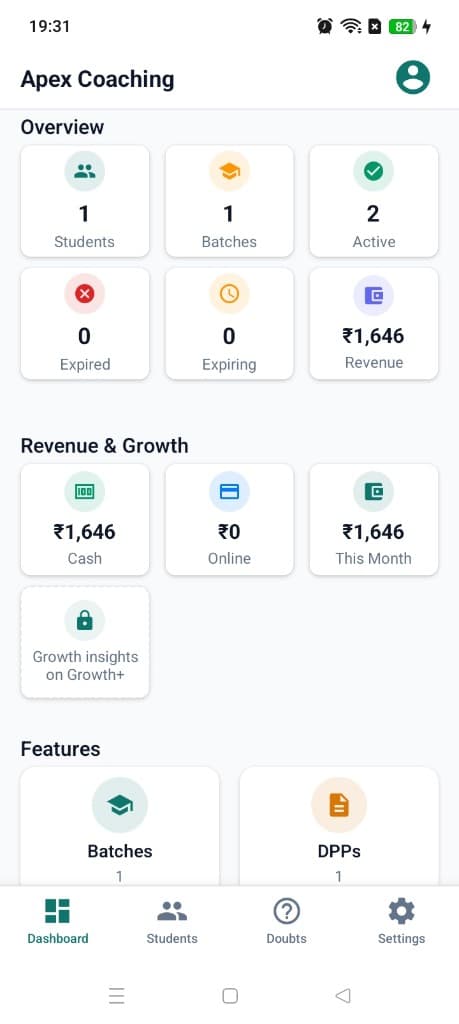
Institute dashboard
Students, batches, subscriptions, and revenue at a glance.
Batch management
Create, edit, and manage enrollments.
DPPs & tests
Daily practice, assignments, and assessments.
Doubts & replies
Threaded Q&A with educator answers and resolved history.
AI tools
Smart DPP evaluation and doubt replies on paid plans.
Live classes
Video meetings with screen share.
Team & roles
Teachers, co-educators, and staff with permissions.
Analytics
Track engagement and export reports.
Staff web portal
Run the office from your desktop
Registers, fee desks and report cards are quicker on a big screen. The web portal gives school staff the same Edualaya data as the app — sign in with your existing staff account, no extra setup.
Included with Enterprise plans for schools and large institutes. Opens in a new tab.
- Attendance registers & CSV export
- Fees, dues & numbered receipts
- Report cards with a marks grid
- Certificates & student ID cards
- AI question bank you approve
- Class and student analytics
- Team roles & class access
Pricing
Plans that scale with your institute or school
Educator prices include GST (India) and are billed through Google Play. Schools and large institutes get custom per-student annual pricing — book a demo.
Basic
For solo educators trying Edualaya.
- 1 active batch
- Up to 50 students total
- 500 MB cloud storage
- Core teaching: DPPs, assignments, tests, materials & doubts
- Basic dashboard metrics
- 5 AI DPP evaluations per month
Growth
For growing institutes.
incl. GST
- Up to 3 active batches
- Unlimited students
- 5 GB cloud storage
- Advanced analytics & export reports
- AI DPP auto-evaluation
- 30 AI doubt replies per month
- 1 co-educator + 1 staff seat
Enterprise
For schools, chains and large institutes.
Per-student pricing, billed annually
- Unlimited classes, sections & branches
- 20 GB cloud storage
- Everything in Growth
- School module: attendance alerts to parents, report cards & fee tracking with receipts
- Teacher & staff roles with per-class access
- Parent app: attendance, dues & report cards
- AI included for every student
- Unlimited team seats
- Priority support & early access to new features
Download
Get Edualaya on Android
Scan the QR code or open Google Play to install the app on your phone.

Edualaya
School & institute management — classes, students, attendance, DPPs, tests, and live classes in one app.
Android only · Sign in with email or Google
Scan to install
Point your phone camera at the code to open the Play Store listing.
FAQ
Frequently asked questions
Everything about the app, the school module, the web portal and plans.
Getting started
What is the difference between educator, student and parent accounts?
Educators (tutors, teachers, school admins and staff) manage the institute — classes or batches, content, students, analytics and subscriptions. Students join with a code and access assigned content, submit work, practise and ask doubts. Parents sign up free and link their children to see attendance, dues, report cards and progress.
How do students join my institute or school?
Share your join code, link or QR code. Students install Edualaya, sign up as a student and enter the code. Schools can also add students one by one or bulk-import them from a CSV — accounts and parent codes are created automatically.
How do I install Edualaya?
Edualaya is available on Android via Google Play. Scroll to the Download section to scan the QR code or open https://play.google.com/store/apps/details?id=com.onetution.app on your phone. Educators can also use the web portal on a computer (see the Web portal questions below).
Which devices are supported?
The Edualaya app is currently available on Android; sign in with email/password or Google. The staff web portal works in any modern desktop or tablet browser. An internet connection is required for syncing content and online features.
Is Edualaya only for schools, or can a single tutor use it?
Both. Solo tutors and small coaching centres use batches on the free Basic or Growth plan. Schools use class sections, teacher logins, attendance, report cards and fees on the Enterprise plan.
Schools & classes
Does Edualaya work for schools?
Yes. On the Enterprise plan, schools get class sections with teacher logins, daily attendance with instant absence alerts to parents, branded report cards, fee tracking with numbered receipts, certificates, ID cards and a free parent app. Book a demo and we will set your school up, usually within a day.
Can each teacher see only their own classes?
Yes. Owners and admins see everything; teachers and staff are scoped to the classes assigned to them, with per-feature permissions you can customise when you invite them. You can also name a class teacher for each section.
How does attendance work?
Teachers mark a class present or absent in a few taps from the app or the web portal. Parents of absent students get a notification straight away, and you can correct past days and export the monthly register as a CSV. Attendance can be marked offline in the app and syncs when the phone is back online.
Can I move a student to another section or promote a whole class at year end?
Yes. Move individual students between sections without losing their history, and promote an entire class to the next one with a preview before anything changes. Transfers are recorded in an audit trail, and only people with access to both classes can transfer.
Does it support multiple branches?
Yes. Enterprise schools can create branches, assign classes and staff to them, and run everything from one account.
Can I use my school's own terms, such as Class, Section and Admission No.?
Yes. Schools see school terminology (classes, sections, admission numbers, class teachers) while coaching institutes see batches. You can also choose which student fields to collect on import and add your own.
Teaching & learning
What can I assign to students?
Daily practice problems (DPPs), homework, assignments students upload from their phones, and timed tests. MCQs are marked automatically; written answers go to a review queue where you or AI-assisted grading can score them, with feedback to the student.
How do report cards work?
Enter paper-exam marks in a class grid, publish a term, and print or share branded report cards as PDF. Parents see published report cards in the parent app.
What is the AI question bank?
Pick a class, subject and chapter and generate up to 25 questions at a time in English or Hindi, including case-study passages. Questions go through automatic quality checks and you approve every one before it can reach students. A CBSE Class 1–10 syllabus is built in and you can edit it; ICSE and state boards use the same list as a starting point, and you can type the topic you taught today.
Can students practise on their own?
Yes. Students get self-practice sessions built from the approved question bank. Answers are graded on the server and never exposed to the app, repeated mistakes come back for revision, and streaks and mastery feed into the student's progress view.
How do doubts work?
Students post a doubt from the app; educators reply, optionally starting from an AI-suggested answer. Resolved threads stay readable so other students can learn from them.
What analytics do I get?
Per-student progress, class mastery by topic, test and DPP results, attendance trends and a command-centre view of what needs attention. Growth and Enterprise plans add exportable reports.
Fees, certificates & parents
How does fee management work?
Create fee structures, assign them to students or classes, record cash and other payments with numbered receipts, waive dues with a reason, and send due reminders. Receipt prefix and numbering are configurable, and receipts export as PDF. Online fee payment and WhatsApp/SMS reminders are rolling out; app notifications work today.
Can I issue certificates and student ID cards?
Yes. Issue serial-numbered certificates (bonafide, transfer, character and your own custom types) with your own wording and page size, and design ID cards with your logo, photo and QR code. Both print or save as PDF from the app and the web portal.
What do parents see?
The free parent app shows attendance, fee dues, published report cards and learning progress for each linked child, plus school announcements and notes. Parents with children in more than one school can link them all to one account.
Can I send announcements?
Yes. Send announcements with images to everyone or to a specific class or audience (students, parents or both) as push notifications, and see how many people have seen them.
Is the app available in Hindi?
Parents and students can switch the app between English and Hindi. AI-generated questions can also be created in Hindi.
Web portal
What is the Edualaya web portal?
A browser-based version of the educator tools for school staff — attendance registers, students, fees, report cards, certificates, ID cards, timetables, class diary, the question bank, analytics and team management. It uses the same data as the app, so changes show up in both instantly.
Who can sign in to the web portal?
Staff of schools on the Enterprise plan: owners, admins, teachers and office staff. Sign in with the same email and password as the app. What each person sees depends on their role and assigned classes. Other accounts are shown an upgrade message.
Do I need a separate account or a download?
No. There is nothing to install and no separate account — the same login works on both. New staff can also create an account on the portal sign-in page using the team invite code from their school.
How do I get access for my school?
Book a demo and we will set up your Enterprise workspace. Once your school is activated, every staff member you invite can use the portal straight away.
Plans & pricing
How do subscriptions work?
Edualaya is free on Basic (1 batch, up to 50 students, 500 MB storage, 5 AI DPP evaluations per month). Growth unlocks 3 batches, unlimited students, 5 GB storage, analytics, export reports, AI tools and team seats. Enterprise is sold per student for schools and large institutes and adds unlimited classes and sections, pooled cloud storage, AI included for every student, unlimited team seats, the school module and the web portal. Educator plans are purchased and managed through Google Play.
What does Edualaya cost for a school or large institute?
Schools and large institutes get custom per-student pricing, billed annually with a GST invoice. Book a demo and we will share a quote on the call.
Can we try it before buying?
Yes. Basic is free to start, and for schools we offer a guided pilot so you can run real classes before committing. Book a demo to arrange it.
How much AI can I use?
Basic includes 5 AI DPP evaluations a month; Growth adds AI auto-evaluation, doubt replies and question generation within monthly limits shared across your team. On Enterprise, every enrolled student adds to a shared monthly AI pool for the whole school, and extra credits can be added if you need more.
What happens if I reach the Basic plan limit?
You can keep using everything within the Basic limits. To add more batches or students, upgrade to Growth at any time from the app.
Data & privacy
Is my institute data secure?
Yes. Data is stored securely on Google Firebase with encrypted connections (HTTPS/TLS). Institute content is only visible to authorized members of your workspace, enforced by server-side access rules rather than just the app screens.
Who can see student data?
Students see their own work. Parents see only their linked children. Teachers see the classes they are assigned to, and sensitive details you collect on import are kept separate from the public profile. Question answer keys are never readable by students.
How does AI use student data?
AI features send only the content needed for the task — for example a question prompt or an answer to grade — to our AI providers, and only when a teacher or student triggers them. Edualaya does not build or train its own models on your students' data.
How can I delete my account?
You can request account deletion at any time. Visit https://edupilotv1.vercel.app/delete-account or email info@edualaya.in from your registered email address.
Still have questions?
Learn · Teach · Grow
Ready to digitize your institute?
Download Edualaya free on Google Play and start managing batches, students, and classes today.